

RX 9060 XT vs RTX 5060 Ti—Complete Gaming Benchmarks
In the RX 9060 XT vs RTX 5060 Ti comparison, if you want the best raw gaming performance and love features like DLSS 4 and ray tracing, go for the RTX 5060 Ti. If you want great gaming at a lower cost and mostly play rasterized games, the RX 9060 XT is a serious competitor that wins or ties in many titles.
Most people search RX 9060 XT vs RTX 5060 Ti because they just want someone to tell them which one to buy. But it’s not that simple. Both are mid-range GPUs made for gamers who want great 1080p or 1440p performance without spending a ton of money, but a 5 FPS difference that looks huge in a chart? You probably won’t even feel it while actually playing. What you will notice is sudden stutters, games slowing down because your GPU ran out of memory, or your PC getting loud because the card is working too hard. Those things matter way more than any number on a graph.
So instead of just throwing charts at you, I watched real gaming videos, read through Reddit threads, and checked what actual buyers are saying after months of use. The real story is way more interesting. The right pick depends on how you game, not just that you game. Let’s get into it.
Is your CPU holding you back? Check it for free with our bottleneck calculator before you buy anything.
RX 9060 XT vs RTX 5060 Ti: Full Specs Comparison
Here’s how these two cards stack up on paper.
| Specification | RX 9060 XT 16GB | RTX 5060 Ti 16GB |
| Architecture | RDNA 4 (4nm) | Blackwell (5nm) |
| Compute Units / CUDA Cores | 32 CUs / 2048 shaders | 4608 CUDA cores |
| Boost Clock | 3130 MHz | 2570 MHz |
| VRAM | 16GB GDDR6 | 16GB GDDR7 |
| Memory Bus | 128-bit | 128-bit |
| Memory Bandwidth | 320 GB/s | 448 GB/s |
| TDP | 150–182W | 180W |
| RT Cores/Accelerators | 32 (Gen 3) | 36 (Gen 4) |
| AI Accelerators | 64 (Gen 2) | 144 (Gen 5) |
| Upscaling Tech | FSR 4 | DLSS 4 |
The VRAM Warning—8GB vs 16GB (Read This Before Buying)
Both the RX 9060 XT and RTX 5060 Ti come in 8 GB and 16 GB versions. And this is super important: do not buy the 8GB version of either card in 2026.
Here’s why this matters so much right now:
Both AMD and NVIDIA are selling these two cards, the same model name in both 8GB and 16GB versions. The 8GB versions are cheaper, but they’re a trap, especially for anyone gaming at 1440p.
Real-world testing in 2026 shows that modern AAA titles like Black Myth: Wukong, Indiana Jones and the Great Circle, and Cyberpunk 2077 regularly push past 8GB of VRAM at 1440p Ultra settings. The 8GB RX 9060 XT has been documented showing serious stutters, frame drops, and texture pop-in once it hits its VRAM limit. AMD actually only showed the 16GB version in their official launch benchmarks, which is clear proof of this.
The 8GB RX 9060 XT also struggles with ray tracing because RT effects chew through VRAM fast. Once it hits the 8GB wall, performance tanks.
Reviewers at WCCFTech confirmed in April 2026 that even though the 8GB card is usable at 1080p in many titles, once you hit VRAM limits in games like Cyberpunk 2077, the experience falls apart. The card can average 50+ FPS in early areas, then stutter badly as the game world loads more assets.
| Both cards in this comparison are the 16GB versions. Always buy 16GB. Full stop. |
9060 XT vs 5060 Ti 16GB: Gaming Benchmarks with Real-World Interpretation
Now here’s the part you actually came for. I’ve compiled benchmark data from multiple sources and added real-world meaning to every number, so you know what it actually feels like to game at those FPS. Because numbers alone don’t tell the whole story.
1- Forza Horizon 5
1080p Extreme Settings
Real-World Take: Both cards can run games at 1080p on very high settings with over 145 FPS. That’s already faster than what a 144Hz monitor can fully show, so in normal gameplay, they feel almost the same.
But there is one small difference: The RX 9060 XT can sometimes drop to about 41 FPS for a very short moment. This means you might rarely notice a tiny stutter or quick lag.
The RTX 5060 Ti stays more stable, around 120 FPS even in heavy moments, so the gameplay feels smoother and more consistent.
So, in simple terms, both are very fast, but the 5060 Ti feels a bit smoother when things get intense.
1440p Extreme Settings
Real-World Take: At 1440p, both cards comfortably hit 100+ FPS. If you’ve got a 144Hz 1440p monitor, both cards will keep you happy. The RX 9060 XT edges ahead slightly, but that scary 0.1% low of 38 FPS on the AMD card means you might occasionally see a micro-stutter during heavy scenes. For most gamers, it’s barely noticeable.
4K Extreme Settings
Real-World Take: In comparison of 5060 ti vs 9060 xt .Neither of these cards is a 4K monster, but 69–73 FPS at 4K Extreme is honestly impressive for mid-range GPUs. It’s playable, but if you want silky smooth 4K, you’d want to drop one setting tier. Again, that 9060 XT 0.1% low is a concern at this res, Forza seems to push the AMD card into brief hitches at 4K.
2- Black Myth: Wukong
1080p High Settings + TSR
Real-World Take: This Unreal Engine 5 beast is gorgeous and demanding. At 1080p High with TSR (Temporal Super Resolution), you’re looking at a very smooth 74–76 FPS average on both cards. That’s firmly in the “feels great” zone. The RX 9060 XT has better 1% lows, meaning fewer sudden framerate drops during those epic boss fights. Both cards perform nearly identically here.
1440p High Settings + TSR (Native Raster)
Real-World Take: At native 1440p, Black Myth drops into the 50s, which is playable, but you’ll feel it during heavy action scenes. This is the point where you really want to turn on DLSS or FSR. The 9060 XT edges ahead slightly, but both are neck-and-neck.
3-Resident Evil Requiem
1080p Normal Preset, FXAA + TAA
| Metric | RTX 5060 Ti | RX 9060 XT | Winner |
|---|---|---|---|
| FPS (Live) | 142 | 142 | Tie |
| 1% Low | 115 | 123 | RX 9060 XT |
| Min FPS | 124 | 134 | RX 9060 XT |
| Avg FPS | 141 | 144 | RX 9060 XT |
| Frametime | 6.6 ms | 7.5 ms | RTX 5060 Ti |
1440p Normal Preset, FXAA + TAA
| Metric | RTX 5060 Ti | RX 9060 XT | Winner |
|---|---|---|---|
| FPS (Live) | 74 | 83 | RX 9060 XT |
| 1% Low | 61 | 71 | RX 9060 XT |
| Avg FPS | 75 | 80 | RX 9060 XT |
| Max FPS | 79 | 84 | RX 9060 XT |
| Frametime | 16.2 ms | 11.5 ms | RX 9060 XT |
Real-World Take: This is probably the biggest win for the RX 9060 XT in this entire comparison. At 1440p, the AMD card serves up an 80 FPS average vs just 75 FPS for the 5060 Ti; that’s a clear 7% lead. And that frametime gap (11.5 ms vs. 16.2 ms) is huge; it means the 9060 XT feels noticeably smoother even at the same FPS number. This game clearly favors AMD’s RDNA 4 architecture.
4-Red Dead Redemption 2
1080p High Settings
| Metric | RTX 5060 Ti | RX 9060 XT | Winner |
|---|---|---|---|
| Avg FPS | 78 | 81 | RX 9060 XT |
| 1% Low | 71 | 74 | RX 9060 XT |
|
0.1% Low
⚠️ Watch this
|
68 | 45 | RTX 5060 Ti |
|
D3D12
DirectX 12 mode
|
76 | 80 | RX 9060 XT |
| Frametime | 12.8 ms | 12.4 ms | RX 9060 XT |
Real-World Take: RDR2 is one of the most beautiful open-world games ever made, and both cards run it very smoothly at 1080p High. An average of 78–81 FPS means you’re riding through the American frontier in buttery smooth glory. The 9060 XT leads slightly, but again, that 0.1% low of 45 FPS is something to watch. The 5060 Ti stays more consistent in rare worst-case moments.
1440p High Settings
| Metric | RTX 5060 Ti | RX 9060 XT | Winner |
|---|---|---|---|
| Avg FPS | 56 | 60 | RX 9060 XT |
| 1% Low | 51 | 55 | RX 9060 XT |
|
0.1% Low
⚠️ Watch this
|
50 | 45 | RTX 5060 Ti |
|
D3D12
DirectX 12 mode
|
54 | 57 | RX 9060 XT |
| Frametime | 18.6 ms | 17.8 ms | RX 9060 XT |
Real-World Take: At 1440p, RDR2 drops to the 56–60 FPS range. It’s still smooth enough for an open-world adventure game; RDR2 isn’t a competitive shooter where every frame matters. The 9060 XT wins by about 7% here. If you’re planning to play RDR2 at 1440p, the AMD card is the better pick at native resolution
Cyberpunk 2077 (Rasterization Only)
1080p Ultra Settings
| Metric | RTX 5060 Ti | RX 9060 XT | Winner |
|---|---|---|---|
| Avg FPS | 112 | 101 | RTX 5060 Ti |
| 1% Low | 88 | 87 | Tie |
|
0.1% Low
Rare worst-case frames
|
77 | 82 | RX 9060 XT |
|
D3D12
DirectX 12 mode
|
112 | 101 | RTX 5060 Ti |
| Frametime | 8.7 ms | 9.6 ms | RTX 5060 Ti |
Real-World Take: Cyberpunk historically favors Nvidia, and that’s still true here. The Nvidia GeForce RTX 5060 Ti pumps out 112 FPS avg vs the 9060 XT’s 101 FPS; that’s an 11% lead. Both feel smooth, but the Nvidia card feels faster and more responsive. If Night City is your main game, lean toward Team Green.
1440p Ultra Settings
RTX 5060 Ti vs RX 9060 XT — 1080p Performance
Tested· Ryzen 7 9800X3D· 32GB DDR5· Latest 2026 Drivers
| Metric | RTX 5060 Ti | RX 9060 XT | Winner |
|---|---|---|---|
| Avg FPS | 64 | 60 | RTX 5060 Ti |
| Low 1% | 57 | 55 | RTX 5060 Ti |
| Low 0.1%Rare worst-case frames | 53 | 51 | RTX 5060 Ti |
| D3D12DirectX 12 mode | 69 | 67 | RTX 5060 Ti |
| Frametime | 14.5 ms | 15.9 ms | RTX 5060 Ti |
Source: mypcbottleneck.com · 2026
Real-World Take: At 1440p Ultra, both cards are in the 60–64 FPS range. The 5060 Ti leads by about 7%. This is totally playable, but if you want 60+ FPS consistently, the Nvidia card is safer. The 9060 XT at 60 FPS will occasionally dip below 60 during heavy outdoor scenes.
4K Ultra Settings (No Upscaling)
Cyberpunk 2077 — 4K Ultra Settings
Tested· Ryzen 7 9800X3D· 32GB DDR5· Latest 2026 Drivers
| Metric | RTX 5060 Ti | RX 9060 XT | Winner |
|---|---|---|---|
| Avg FPS | 27 | 26 | Tie |
| Low 1% | 24 | 23 | Tie |
| FrametimeLower is better | 36.2 ms | 33.5 ms | RX 9060 XT |
Source: mypcbottleneck.com · 2026
Real-World Take: Both cards struggle at 4K native Ultra in Cyberpunk; 26–27 FPS is not playable without upscaling. But this isn’t a failure; these are mid-range cards. Turn on DLSS 4 or FSR 4, and the numbers jump dramatically. At 4K native, they’re basically tied.
1440p Ultra + Ray Tracing + DLSS 4 / FSR 4
Cyberpunk 2077 — 1440p Ultra + Ray Tracing + DLSS 4 / FSR 4
Tested· Ryzen 7 9800X3D· 32GB DDR5· Latest 2026 Drivers
| Metric | RTX 5060 Ti | RX 9060 XT | Winner |
|---|---|---|---|
| Avg FPS | 55 | 52 | RTX 5060 Ti |
| Low 1% | 50 | 48 | RTX 5060 Ti |
| Low 0.1%Rare worst-case frames | 48 | 44 | RTX 5060 Ti |
| D3D12DirectX 12 mode | 56 | 50 | RTX 5060 Ti |
| FrametimeLower is better | 20.4 ms | 20.1 ms | Tie |
Source: mypcbottleneck.com · 2026
Real-World Take: With full RT on and upscaling active, the 5060 Ti holds about a 6% lead. Neither card is fully comfortable here; 52–55 FPS with RT is technically playable but not smooth. If you want RT in Cyberpunk at 1440p, the 5060 Ti is the better option, but honestly, both cards struggle. This is where the RTX 5070 starts looking tempting.
| Score of all the above benchmarks for different games is AMD Radeon RX 9060 XT wins 7 tests, RTX 5060 Ti wins 5, and there are 2 ties. At native rasterization, the RX 9060 XT actually wins more games. But when DLSS 4 and ray tracing come into play, the 5060 Ti takes the lead. |
Ray Tracing & Upscaling: DLSS 4 vs FSR 4
This is honestly one of the biggest deciding factors in 2026.
DLSS 4 (RTX 5060 Ti)
DLSS 4 is NVIDIA’s AI-powered magic. The key new feature is Multi-Frame Generation. Your GPU generates extra fake frames using AI, which can make your game feel way smoother than the actual FPS count. It’s like having a secret FPS multiplier.
- Quality preset: Looks nearly identical to native. Almost no visual artifacts.
- Performance preset: Big FPS gain, some softness. Still very good.
- Multi-Frame Gen: Can 2x or 4x your frames. Wild. But adds a little input latency.
FSR 4 / Redstone (RX 9060 XT)
AMD’s FSR 4 is a massive jump over FSR 3. For the first time, it uses actual AI (machine learning) instead of pure math tricks. The results are genuinely impressive.
- Quality preset: Very close to DLSS 4 Quality. Seriously hard to tell apart.
- Performance preset: Good, but DLSS 4 is cleaner at this level.
- No Multi-Frame Gen equivalent: FSR 4 doesn’t have a feature that matches DLSS 4’s MFG shot-for-shot.
The Bottom Line: DLSS 4 is still the better upscaling tech overall, especially if you use Performance or Ultra Performance presets. But FSR 4 has closed the gap dramatically. For most gamers at the Quality preset, FSR 4 is totally good enough.
Which CPU Won’t Bottleneck These GPUs?
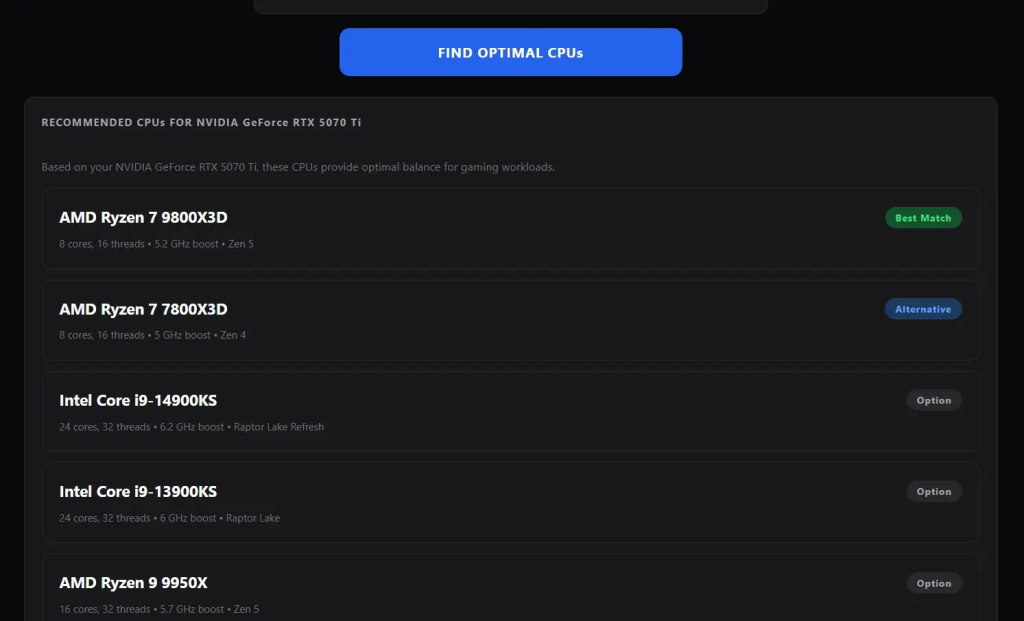
You don’t need an expensive CPU for these two mid-range GPUs because in the CPU vs GPU balance, these cards are designed to perform well without requiring a high-end processor.A Ryzen 5 9600, Ryzen 5 7600, or Intel i5-14400F will work perfectly at both 1080p and 1440p. Even an older Ryzen 5 5600 or i5-12400F does the job fine.
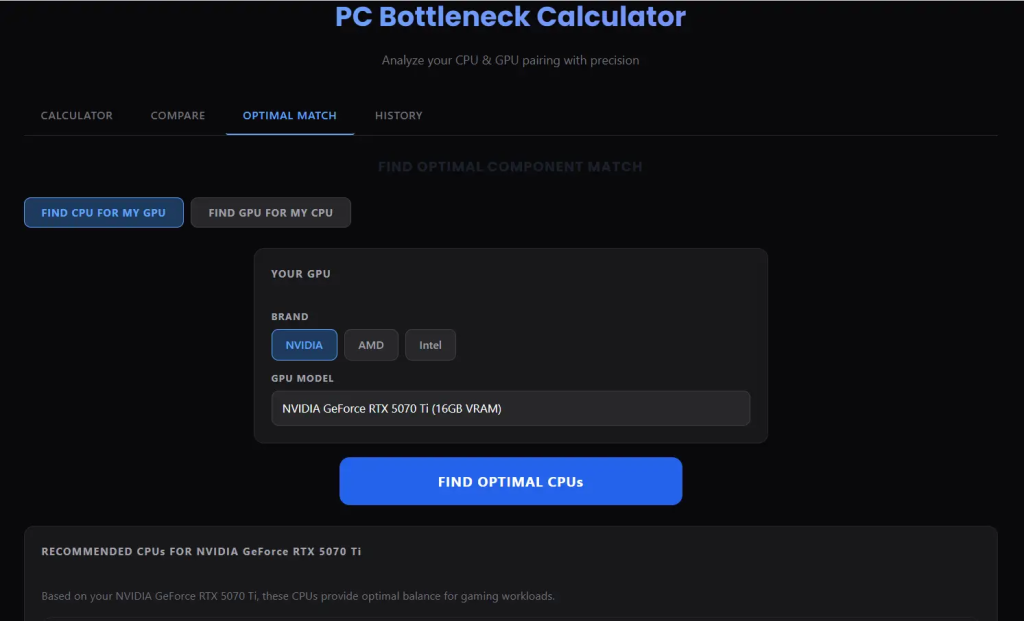
To double-check, we tested our Bottleneck Calculator with a higher-tier GPU like the RTX 5070 Ti, and as you can see in the screenshot, it correctly recommends top CPUs like the Ryzen 7 9800X3D with zero GPU CPU bottleneck. The same tool works for any GPU you own.
Who Should Buy the AMD RX 9060 XT 16GB?
We may earn a commission from purchases made through these links, at no extra cost to you.
- You want to save money (it is cheaper than the 5060 Ti at MSRP)
- You play open-world games like RDR2, Forza Horizon, or Resident Evil
- Your main target is 1440p gaming at high settings
- You care about power efficiency or have a smaller PSU
- You don’t care much about ray tracing
- You mostly play games that are not Nvidia-optimized titles
Who Should Buy the NVIDIA RTX 5060 Ti 16GB?
- You want the best upscaling tech (DLSS 4 Multi-Frame Gen is a real advantage)
- Ray tracing and path tracing matter to you
- You play Cyberpunk 2077, Alan Wake 2, or other Nvidia-optimized games
- You are gaming at 4K with upscaling
- You use AI tools like Stable Diffusion, DaVinci Resolve AI features, etc.
- You want better future-proofing for DLSS-supported titles
Common Questions from Reddit & Forums
I went through Reddit (r/buildapc, r/hardware, and r/pcgaming); Linus Tech Tips forums; and Tom’s Hardware forums to find the questions people are actually asking. I’ve included all of these questions with detailed answers in the FAQs section below.
FAQs: RX 9060 XT vs RTX 5060 Ti
Is the 9060 XT really better than the 5060 Ti?
It depends on the game. In pure rasterization gaming, the 9060 XT wins or ties in more titles than the 5060 Ti. But the 5060 Ti’s DLSS 4 advantage is real; if you use upscaling, the Nvidia card often comes out on top.
On the TechPowerUp poll, over 16,000 people voted on which they’d buy; the 9060 XT won with 8,500+ votes vs the 5060 Ti’s 3,500. Community sentiment strongly favors AMD’s value proposition.
Should I get the 8GB or 16GB version?
Always get the 16GB version if you can. The 8GB version of both cards is a trap in 2026. Modern AAA games can eat through 8GB of VRAM fast; titles like Black Myth Wukong and Indiana Jones can exceed 8GB at 1440p Ultra. The 16GB version costs a bit more, but it’s the correct choice.
Does the 9060 XT have the 0.1% low problem in all games?
No, mostly just in Forza Horizon 5, based on tested benchmarks. The extremely low 0.1% numbers (38–42 FPS) in Forza are unusual and may be driver-related. In most other games, the 9060 XT’s lows are solid. This is something to watch, but not a dealbreaker. No, mostly just in Forza Horizon 5, based on tested benchmarks.
The extremely low 0.1% numbers (38–42 FPS) in Forza are unusual and may be driver-related. In most other games, the 9060 XT’s lows are solid. This is something to watch, but not a dealbreaker.
Is DLSS 4 really that much better than FSR 4?
At quality preset, barely. At Performance and Ultra Performance presets, yes, DLSS 4 is clearly cleaner. And Multi-Frame Generation (only available on DLSS 4 in supported games) is genuinely a next-level feature with no AMD equivalent. But FSR 4 has gotten so much better that it’s totally acceptable for 90% of gamers.
Can these cards handle 4K gaming?
Yes, but with caveats. Both cards handle 4K well in less demanding games or with upscaling enabled. At native 4K Ultra in demanding titles, you’ll need to drop the settings. With DLSS 4 / FSR 4 quality at 4K, both cards become much more capable.
Is the RTX 5060 Ti worth the extra cost over the 9060 XT?
If gaming is your only use case and you mostly play rasterized games, probably not. The 9060 XT wins or ties in most of those. But if you want DLSS 4, better ray tracing, AI tools, and Nvidia’s driver reliability reputation, the extra money for the 5060 Ti is worth considering.
Which is better for 1080p gaming?
Both are overkill for 1080p gaming. The RX 9060 XT wins or ties in most 1080p tests and will give you 100+ FPS in most games. Go with whichever fits your budget better.
Is the RX 9060 XT good for 1440p gaming?
Yes! The 9060 XT is actually great at 1440p. It often matches or beats the RTX 5060 Ti in native 1440p rasterization tests. Pair it with FSR 4, and you’ll be very happy.
Can I use the RX 9060 XT for content creation?
Yes, but for AI-heavy tasks like Stable Diffusion or DaVinci Resolve AI features, Nvidia’s Tensor cores give the RTX 5060 Ti a significant advantage. For regular video editing and streaming, both cards work great.
Will either GPU be future-proof for the next 3 years?
Both cards should handle 1080p gaming easily for 3+ years. At 1440p, they’ll start needing upscaling help for the most demanding games in 2–3 years. The 16GB VRAM buffer helps a lot with future-proofing.
Final Verdict
To conclude the comparison of the RX 9060 XT vs RTX 5060 Ti:
- If you game at 1440p native raster, 9060 XT wins more often.
- If you game at 1440p with upscaling, the 5060 Ti edges ahead thanks to DLSS 4.
- If you play Cyberpunk / heavy RT games, then RTX 5060 Ti.
- If you game at 1080p, choose either card. Save money; go 9060 XT.
- If you want the best value for your dollar, RX 9060 XT is the community’s pick.
In short, as with any Nvidia vs. AMD debate, AMD wins on value, and Nvidia wins on features.
